Swift iOS Apps with Claude Code
이미지 속의 텍스트를 추출하여 원문과 한국어 번역으로 정리해 드립니다.
텍스트 변환 결과
원문 (English)
"We are going to create an app that will help us plan our thoughts in an order, and for those ideas that we are going to use, we will use some on-device model for that. Can you suggest us some app names for that?"
한국어 번역
"우리는 생각을 순서대로 정리하는 데 도움이 되는 앱을 만들 예정입니다. 그리고 우리가 사용할 아이디어들을 위해 온디바이스(on-device) 모델을 활용할 계획입니다. 이에 어울리는 앱 이름을 몇 가지 추천해 주실 수 있나요?"
앱 이름 추천 (참고용)
생각의 정리와 온디바이스 AI의 특징(보안, 속도, 개인화)을 결합한 이름들입니다.
| 카테고리 | 앱 이름 제안 | 특징 및 의미 |
|---|---|---|
| 직관적/기능적 | ThoughtFlow | 생각의 흐름을 막힘없이 정리한다는 의미 |
| 보안/온디바이스 | PrivateMind | 외부 유출 없는 온디바이스 모델의 보안성 강조 |
| 구조화/정리 | Orderly AI | 어지러운 아이디어를 질서 있게 정렬해주는 도구 |
| 함축적/세련됨 | CoreSync | 기기 내부(Core)에서 생각과 기술이 동기화됨 |
| 창의성 | NeuralPath | 온디바이스 모델을 통한 지능적인 경로 생성 |
원하시는 앱 이름의 느낌(예: 귀여운 이름, 전문적인 이름 등)을 말씀해 주시면 더 구체적으로 제안해 드릴 수 있습니다. 추가로 도움을 드릴까요?
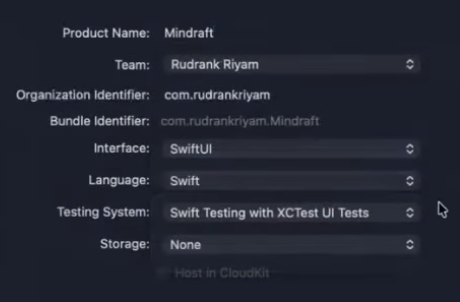
Let's go with Mindraft, I have already create the project in downloads. Can you switch to a new instance of Claude Code using it?
이미지 속의 텍스트를 추출하여 원문과 한국어 번역으로 정리해 드립니다.
텍스트 변환 결과
원문 (English)
"Let's go with Mindraft, I have already created the project in downloads. Can you switch to a new instance of Claude Code using it?"
한국어 번역
"(앱 이름을) Mindraft로 정합시다. 이미 다운로드 폴더에 프로젝트를 생성해 두었습니다. 해당 프로젝트를 사용해서 Claude Code의 새로운 인스턴스로 전환해 줄 수 있나요?"
Mindraft라는 이름이 결정되었군요! 프로젝트 파일이 준비되었다면, 해당 경로를 기반으로 다음 단계(코드 작성이나 아키텍처 설계 등)를 진행할 수 있습니다.
혹시 이 프로젝트를 위해 Mindraft의 로고 아이디어나 초기 폴더 구조를 제안해 드릴까요?
원문: "let's a readme.md first and then /Applications/Xcode-26.2.0.app/Contents/PlugIns/IDEIntelligenceChat.framework/Versions/A/Resources/AdditionalDocumentation/FoundationModels-Using-on-device-LLM-in-your-app.md add this in the link to reference foundation models and liquid glass design in the parent directory."
한국어 번역: "먼저 readme.md를 작성합시다. 그런 다음 /Applications/Xcode-26.2.0.app/Contents/PlugIns/IDEIntelligenceChat.framework/Versions/A/Resources/AdditionalDocumentation/FoundationModels-Using-on-device-LLM-in-your-app.md 경로의 파일을 추가하여, 상위 디렉터리에 있는 파운데이션 모델과 리퀴드 글래스(liquid glass) 디자인을 참조할 수 있도록 링크를 넣으세요."
WWDC25 Swift/iOS 개발 참고 자료 — Apple 공식 링크 모음
강사님이 제공한 마크다운 파일들의 원본 Apple 공식 문서 및 WWDC25 세션 비디오 링크입니다.
⚠️ 강사님의.md파일은 이 공식 자료들을 요약/정리한 커스텀 문서이므로, 동일한 파일을 직접 다운로드할 수는 없습니다.
아래 공식 링크에서 원본 내용을 확인하고 학습할 수 있습니다.
1. FoundationModels-Using-on-device-LLM-in-your-app.md
Apple의 온디바이스 LLM(Foundation Models 프레임워크) 활용
| 구분 | 링크 |
|---|---|
| 📖 공식 문서 | https://developer.apple.com/documentation/FoundationModels |
| 🎬 세션: Meet the Foundation Models framework | https://developer.apple.com/videos/play/wwdc2025/286/ |
| 🎬 세션: Deep dive into the Foundation Models framework | https://developer.apple.com/videos/play/wwdc2025/301/ |
| 🎬 코드-어롱: Bring on-device AI to your app | https://developer.apple.com/videos/play/wwdc2025/259/ |
| 🎬 세션: Prompt design & safety | https://developer.apple.com/videos/play/wwdc2025/248/ |
2. AppIntents-Updates.md
App Intents 프레임워크 업데이트 (Siri, Spotlight, Visual Intelligence 통합)
| 구분 | 링크 |
|---|---|
| 📖 공식 문서 | https://developer.apple.com/documentation/AppIntents |
| 📖 What's New - iOS | https://developer.apple.com/wwdc25/guides/ios/ |
| 🎬 세션: What's new in App Intents | https://developer.apple.com/videos/play/wwdc2025/228/ |
3. AppKit-Implementing-Liquid-Glass-Design.md
AppKit에서 Liquid Glass 디자인 구현
| 구분 | 링크 |
|---|---|
| 🎬 세션: Build an AppKit app with the new design | https://developer.apple.com/videos/play/wwdc2025/310/ |
| 🎬 세션: Meet Liquid Glass | https://developer.apple.com/videos/play/wwdc2025/269/ |
| 🎬 세션: Get to know the new design system | https://developer.apple.com/videos/play/wwdc2025/252/ |
4. Foundation-AttributedString-Updates.md
Foundation AttributedString 업데이트
| 구분 | 링크 |
|---|---|
| 📖 공식 문서 | https://developer.apple.com/documentation/foundation/attributedstring |
| 🎬 세션: What's new in SwiftUI | https://developer.apple.com/videos/play/wwdc2025/256/ |
| 🎬 코드-어롱: Cook up a rich text experience | https://developer.apple.com/videos/play/wwdc2025/258/ |
5. Implementing-Assistive-Access-in-iOS.md
iOS에서 Assistive Access 구현
| 구분 | 링크 |
|---|---|
| 📖 공식 문서 | https://developer.apple.com/documentation/Accessibility |
| 🎬 세션: Build accessible experiences for Assistive Access | https://developer.apple.com/videos/play/wwdc2025/246/ |
6. Implementing-Visual-Intelligence-in-iOS.md
iOS에서 Visual Intelligence 구현
| 구분 | 링크 |
|---|---|
| 📖 공식 문서 | https://developer.apple.com/documentation/VisualIntelligence |
| 📖 앱 통합 가이드 | https://developer.apple.com/documentation/VisualIntelligence/integrating-your-app-with-visual-intelligence |
| 📖 Apple Intelligence 개요 | https://developer.apple.com/apple-intelligence/ |
7. MapKit-GeoToolbox-PlaceDescriptors.md
MapKit GeoToolbox 및 PlaceDescriptors
| 구분 | 링크 |
|---|---|
| 📖 GeoToolbox 공식 문서 | https://developer.apple.com/documentation/GeoToolbox |
| 📖 MapKit 공식 문서 | https://developer.apple.com/documentation/MapKit |
| 🎬 세션: What's new in MapKit | https://developer.apple.com/videos/play/wwdc2025/263/ |
8. StoreKit-Updates.md
StoreKit 업데이트
| 구분 | 링크 |
|---|---|
| 📖 공식 문서 | https://developer.apple.com/documentation/StoreKit |
| 🎬 세션: What's new in StoreKit | https://developer.apple.com/videos/play/wwdc2025/236/ |
9. Swift-Charts-3D-Visualization.md
Swift Charts 3D 시각화
| 구분 | 링크 |
|---|---|
| 📖 공식 문서 | https://developer.apple.com/documentation/Charts |
| 🎬 세션: Bring Swift Charts to the third dimension | https://developer.apple.com/videos/play/wwdc2025/313/ |
10. Swift-Concurrency-Updates.md
Swift Concurrency 업데이트
| 구분 | 링크 |
|---|---|
| 📖 공식 문서 | https://developer.apple.com/documentation/Swift/Concurrency |
| 🎬 세션: What's new in Swift | https://developer.apple.com/videos/play/wwdc2025/250/ |
11. Swift-InlineArray-Span.md
Swift InlineArray 및 Span
| 구분 | 링크 |
|---|---|
| 🎬 세션: What's new in Swift | https://developer.apple.com/videos/play/wwdc2025/250/ |
| 📖 Swift Evolution - InlineArray | https://github.com/swiftlang/swift-evolution/blob/main/proposals/0453-inline-array.md |
| 📖 Swift Evolution - Span | https://github.com/swiftlang/swift-evolution/blob/main/proposals/0447-span-access-shared-contiguous-storage.md |
12. SwiftData-Class-Inheritance.md
SwiftData 클래스 상속
| 구분 | 링크 |
|---|---|
| 📖 공식 문서 | https://developer.apple.com/documentation/SwiftData/Adopting-inheritance-in-SwiftData |
| 🎬 세션: SwiftData: Dive into inheritance and schema migration | https://developer.apple.com/videos/play/wwdc2025/291/ |
13. SwiftUI-AlarmKit-Integration.md
SwiftUI와 AlarmKit 통합
| 구분 | 링크 |
|---|---|
| 📖 공식 문서 | https://developer.apple.com/documentation/AlarmKit |
| 📖 알람 스케줄링 가이드 | https://developer.apple.com/documentation/AlarmKit/scheduling-an-alarm-with-alarmkit |
14. SwiftUI-Implementing-Liquid-Glass-Design.md
SwiftUI에서 Liquid Glass 디자인 구현
| 구분 | 링크 |
|---|---|
| 📖 공식 문서 | https://developer.apple.com/documentation/SwiftUI/Applying-Liquid-Glass-to-custom-views |
| 📖 glassEffect API | https://developer.apple.com/documentation/swiftui/view/glasseffect(_:in:) |
| 📖 Glass 구조체 | https://developer.apple.com/documentation/swiftui/glass |
| 📖 샘플 프로젝트: Landmarks | https://developer.apple.com/documentation/SwiftUI/Landmarks-Building-an-app-with-Liquid-Glass |
| 🎬 세션: Build a SwiftUI app with the new design | https://developer.apple.com/videos/play/wwdc2025/323/ |
15. SwiftUI-New-Toolbar-Features.md
SwiftUI 새로운 Toolbar 기능
| 구분 | 링크 |
|---|---|
| 🎬 세션: What's new in SwiftUI | https://developer.apple.com/videos/play/wwdc2025/256/ |
| 🎬 세션: Build a SwiftUI app with the new design | https://developer.apple.com/videos/play/wwdc2025/323/ |
16. SwiftUI-Styled-Text-Editing.md
SwiftUI 스타일 텍스트 편집 (Rich Text)
| 구분 | 링크 |
|---|---|
| 🎬 코드-어롱: Cook up a rich text experience in SwiftUI | https://developer.apple.com/videos/play/wwdc2025/258/ |
| 🎬 세션: What's new in SwiftUI | https://developer.apple.com/videos/play/wwdc2025/256/ |
17. SwiftUI-WebKit-Integration.md
SwiftUI와 WebKit 통합
| 구분 | 링크 |
|---|---|
| 🎬 세션: Meet WebKit for SwiftUI | https://developer.apple.com/videos/play/wwdc2025/297/ |
| 📖 What's New - SwiftUI 가이드 | https://developer.apple.com/wwdc25/guides/swiftui/ |
18. UIKit-Implementing-Liquid-Glass-Design.md
UIKit에서 Liquid Glass 디자인 구현
| 구분 | 링크 |
|---|---|
| 🎬 세션: Build a UIKit app with the new design | https://developer.apple.com/videos/play/wwdc2025/275/ |
| 🎬 세션: What's new in UIKit | https://developer.apple.com/videos/play/wwdc2025/230/ |
19. WidgetKit-Implementing-Liquid-Glass-Design.md
WidgetKit에서 Liquid Glass 디자인 구현
| 구분 | 링크 |
|---|---|
| 📖 WidgetKit 공식 문서 | https://developer.apple.com/documentation/WidgetKit |
| 🎬 세션: What's new in widgets | https://developer.apple.com/videos/play/wwdc2025/232/ |
20. Widgets-for-visionOS.md
visionOS용 Widgets
| 구분 | 링크 |
|---|---|
| 🎬 세션: What's new in visionOS 26 | https://developer.apple.com/videos/play/wwdc2025/267/ |
| 🎬 세션: What's new in widgets | https://developer.apple.com/videos/play/wwdc2025/232/ |
📚 추가 추천 리소스
| 리소스 | 링크 |
|---|---|
| WWDC25 전체 세션 목록 | https://developer.apple.com/wwdc25/sessions/ |
| WWDC Notes (커뮤니티 노트) | https://wwdcnotes.com |
| WWDC Community (GitHub) | https://github.com/twostraws/wwdc |
| iOS 26 예제 모음 (GitHub) | https://github.com/topics/wwdc25 |
| Liquid Glass Reference (GitHub) | https://github.com/conorluddy/LiquidGlassReference |
| Foundation Models 예제 (GitHub) | https://github.com/azamsharpschool/FoundationModels-Examples |
| WWDC25 Viewing Guide | https://useyourloaf.com/blog/wwdc-2025-viewing-guide/ |
마지막 업데이트: 2026-02-05